
先前用 GitHub Actions、(OpenRouter/ APIFree) 的 API key,搭配 AI 更新新聞並推送到 Telegram 群組,做過一套粵語 podcast 流程, 詳情請參閱 廣東話 AI Daily Podcast:如何用 GitHub 「輕鬆」建立穩健系統(告別訂閱壓力), 這次改用本地 AI——Ollama + Hermes——想確認:不靠雲端 LLM key,本機能否完成摘要、翻譯成粵語,並產出本地粵語 Podcast。
我先給 Hermes 一個 YouTube 連結:Running AI Local Models Isn’t Safe — Here’s Why。請 Hermes 摘要影片、翻譯成粵語,並以 podcast 風格呈現。腳本沒問題;真正卡關的是在 Windows Docker 上產出粵語 MP3,再跟Github Actions 流程一樣送到 Telegram。
Table of Contents
第一部分 — 流程說明

- YouTube URL → Hermes 用本機 Ollama 摘要並翻成粵語 podcast 腳本
- 腳本 → Edge TTS(
text_to_speech)合成 MP3 - MP3 落在 Artifacts 或
cache/audio - Telegram 用
hermes send/cron,或docker exec+ Bot API(agent 對話預設不能直接發檔)
第二部分 — 用 Ollama 設定 Hermes(本地 LLM)
你需要什麼
- Windows 上的 Docker Desktop
- 主機上的 Ollama,並已拉取模型(例如
gemma4:latest) - Ollama 可連到
http://127.0.0.1:11434/api/tags
提高 Ollama context,供 Hermes agent 使用
Hermes 的工具需要 ≥64k context。設定使用者環境變數後重啟 Ollama:
[Environment]::SetEnvironmentVariable("OLLAMA_CONTEXT_LENGTH", "65536", "User")
[Environment]::SetEnvironmentVariable("OLLAMA_KEEP_ALIVE", "24h", "User")Code language: PHP (php)
讓 Hermes 指向主機上的 Ollama
在 Docker 裡,localhost 是容器本身,要用 host.docker.internal。
%USERPROFILE%\.hermes\config.yaml:
model:
  default: "gemma4:latest"
  provider: "custom"
  base_url: "http://host.docker.internal:11434/v1"
  api_key: "none"
  context_length: 65536
  ollama_num_ctx: 65536

providers:
  ollama:
    base_url: "http://host.docker.internal:11434/v1"
api_key: "none"Code language: JavaScript (javascript)%USERPROFILE%\.hermes\.env(本地 LLM 最低設定):
OPENAI_API_KEY=none
OPENAI_BASE_URL=http://host.docker.internal:11434/v1
HERMES_API_TIMEOUT=1800
HERMES_STREAM_READ_TIMEOUT=1800Code language: JavaScript (javascript)
在 Windows Docker 啟動 Hermes
用 Compose 跑 nousresearch/hermes-agent:latest,掛載 %USERPROFILE%\.hermes → /opt/data,並加上 host.docker.internal:host-gateway。
cd G:\vvv\project-local\hermes
docker compose up -d
docker exec hermes hermes chat -q "Reply with exactly: docker-ok"Code language: JavaScript (javascript)
可選:安裝 Hermes Desktop,啟用 Docker dashboard(http://127.0.0.1:9119),在 Settings → Gateways → Remote gateway 連上。
用哪個本地模型?
這是我第一次試,只在自己的電腦上測:約 32 GB RAM、純 CPU。我用 gemma4:latest(與 gemma4:e4b 同一組權重):有 tools、支援長 context。沒有獨立 GPU 時,更大的模型會非常慢。
就緒後,Hermes 就能抓/摘要 YouTube,並起草粵語 podcast 腳本。下一步:把腳本變成 MP3。這次我全程手動;日後再做成 cron。
第三部分 — 為什麼 Hermes 交不出粵語 MP3
我沿用先前的那篇〈廣東話 AI Daily Podcast:如何用 GitHub 「輕鬆」建立穩健系統(告別訂閱壓力)〉裡的 prompt, 僅改為由一位主講人負責
。腳本成功生成了,但 MP3 卡在語音合成。
Log 指向兩個問題:
- 沒有 TTS provider — 有呼叫
text_to_speech,但無法合成(缺edge_tts;雲端 TTS key 也是空的)。 - 長腳本逾時 — 有一次跑到約 420 秒仍得不到可用音訊。
一句話:Hermes 的 Windows Docker 環境裡 TTS 缺失或不可用,粵語 podcast 就永遠變不成 MP3。
1. 缺少 TTS — 雲端或本地(Edge TTS)
生成 MP3需要語音引擎, 粵語 podcast 我用本地 Edge TTS(香港聲線);若不想跟 Docker 安裝搏鬥、又能接受 API key/費用,用雲端 TTS。
本地 TTS:Edge TTS(適合粵語)
- 免費、不需 API key
- 聲線:
zh-HK-HiuMaanNeural、zh-HK-WanLungNeural、zh-HK-HiuGaaiNeural
在 config.yaml 加上下文部分:
tts:
  provider: edge
  edge:
    voice: zh-HK-HiuMaanNeural
請 Hermes 只對已完成的 podcast 腳本做 TTS。先測一句,例如:
TTS this in Cantonese: 你好,今日天氣幾好。
長腳本請分段合成,避免逾時。
雲端 TTS
在 %USERPROFILE%\.hermes\.env:
VOICE_TOOLS_OPENAI_KEY=sk-...
# or
ELEVENLABS_API_KEY=...Code language: PHP (php)
然後 docker compose restart。
- OpenAI TTS 對粵語常偏普通話味。
- ElevenLabs 多語通常更適合粵語。
- 聊天用的 key(OpenRouter、APIFree、Ollama)不能取代 Hermes TTS。
2. Windows Docker 上 Edge TTS 安裝失敗 — 解法
文件常寫:
docker exec -it hermes hermes pm install --extra edge-tts在 Windows Docker 上常失敗:
[Errno 17] File exists: '.../terminfo/L'Code language: JavaScript (javascript)原因: Hermes 把 Linux 的 terminfo 同步到 bind-mount 的 ~/.hermes。Linux 同時有 terminfo/l 與 terminfo/L;Windows 當成同一個檔名,安裝中止(還可能卡在 lock)。
解法 — 直接裝進容器 venv,跳過 pm sync:
docker exec hermes sh -c "pkill -f 'pm install' 2>/dev/null; rm -f /opt/data/installs/*/.install.lock /opt/data/tools/.install.lock"

docker exec -u root hermes sh -c "export PATH=/opt/hermes/tools/uv-0.13.5-linux-x64:`$PATH; uv pip install --python /opt/hermes/.venv/bin/python edge-tts"
docker compose restartCode language: JavaScript (javascript)
確認 edge-tts 可用後,對既有粵語腳本再跑一次 TTS。
注意: 套件在容器檔案系統裡。重建容器就要重裝。在 Hermes 修好 Windows 的 terminfo sync 之前,請優先用這招,而不是 hermes pm install --extra edge-tts。
Podcast MP3 存在哪裡
Hermes 會在兩處露出成品音訊:
- Hermes UI → Artifacts — 開啟對話/session,從 Artifacts 下載 MP3。
- 磁碟快取 — 同一批檔在:
%USERPROFILE%\.hermes\cache\audio
(Docker 路徑:/opt/data/cache/audio)
第四部分 — 把粵語 podcast MP3 送到 Telegram
MP3 就緒後(Artifacts 或 cache\audio),用跟 GitHub Actions 一樣的最後一步:把單集發到 Telegram 群組。
1. 建立 bot 並加入群組
在 %USERPROFILE%\.hermes\.env 取消註解並填入:
- 找 @BotFather → 建立 bot → 複製 bot token。
- 把 bot 加進 Telegram 群組(或頻道)。
- 群組:給 bot **傳送訊息(與媒體)**權限。
- 取得 chat ID(群組 ID 多半是負數,例如
-100…)。可用輔助 bot,或 gateway 連上後用 Hermes。
2. 在 .env 設定 Hermes Telegram
TELEGRAM_BOT_TOKEN=123456:ABC...
TELEGRAM_ALLOWED_USERS=your_user_id          # who may talk to the bot
TELEGRAM_HOME_CHANNEL=-100xxxxxxxxxx         # default group/channel for delivery
TELEGRAM_HOME_CHANNEL_NAME=Cantonese Podcast
# Optional forum topic for cron posts:
# TELEGRAM_CRON_THREAD_ID=123Code language: PHP (php)
重啟讓 gateway 讀到設定:
cd G:\vvv\project-local\hermes
docker compose restart
Hermes 預設用 long polling。只有對外公開 HTTPS(如 Fly/Railway)才需要設 TELEGRAM_WEBHOOK_URL。家用 Windows Docker 用 polling 就夠。
3. 從 Hermes 傳到 Telegram
可以這樣問 Hermes:
Use text_to_speech on the Cantonese script and save an MP3.
或先短測:
TTS this in Cantonese: 你好,今日天氣幾好。
Hermes 會呼叫內建 text_to_speech;Edge 不需要 API key。
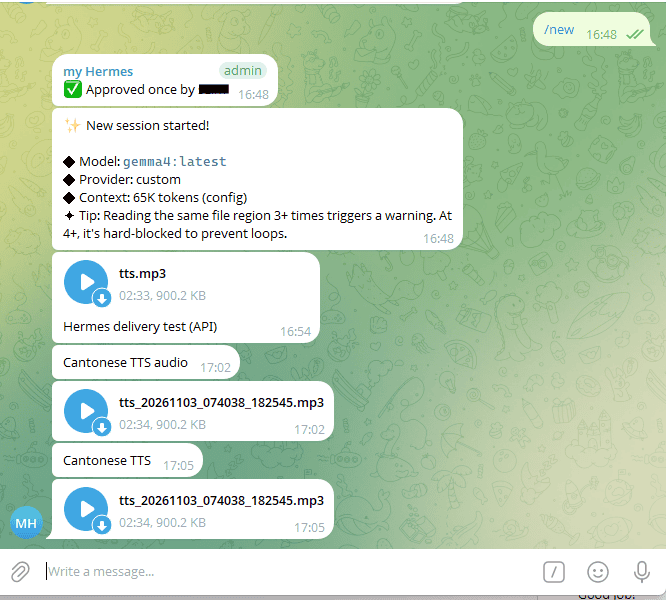
完成的音訊會出現在 Hermes UI → Artifacts,以及 %USERPROFILE%\.hermes\cache\audio。之後可用 hermes send + MEDIA:<path> 發到 Telegram,或用下一節的 Bot API,或請 Hermes 把 tts.....mp3 以 audio 傳到 Telegram。
Hermes 應附上產生的音訊(Artifacts/cache/audio),經已設定的 bot 送到 TELEGRAM_HOME_CHANNEL。
若要做成固定本地流程(接近 GitHub Actions cron),把 Hermes cron 的投遞目標設成同一個 home channel,讓排程的「摘要 → TTS → Telegram」都進該群。
4. Telegram Bot API 備案:用 docker exec 手動 sendAudio
用命令列介面(CLI), 我剛剛成功使用過了:
docker exec hermes hermes send --to telegram:-100xxxxxxxxxx --json "Cantonese TTS MEDIA:/opt/data/cache/audio/tts_....mp3"Code language: JavaScript (javascript)
或更簡短(使用主頻道 home channel):
docker exec hermes hermes send --to telegram --json "MEDIA:/opt/data/cache/audio/tts_.....mp3"Code language: JavaScript (javascript)若格式/大小有怪問題,把 Bot API 的 sendAudio 改成 sendDocument。Bot 上傳通常約 50 MB 上限——單集別太長,或拆段。
5. 本地堆疊 vs GitHub Actions 投遞
| 步驟 | 先前(Actions + OpenRouter/APIFree) | 本地(Ollama + Hermes) |
|---|---|---|
| 腳本 | CI 裡的雲端 LLM | 主機上的 Hermes + Ollama |
| MP3 | 雲端/CI TTS | Edge TTS(或雲端 TTS key) |
| Telegram | 工作流裡的 Bot API | Hermes Telegram gateway,或從 cache\audio 用 Bot API |
本地 AI 可取代 LLM,也可取代 TTS。Telegram 仍需要 bot token,並能連到 api.telegram.org——這段不是完全「斷網隔離」,對群組投遞來說可接受。
參考連結
YouTube 來源:
Running AI Local Models Isn’t Safe — Here’s Why
Telegram 群組內的生成MP3:
常見問題
1. Hermes + Ollama 能取代我的 GitHub Actions + OpenRouter/APIFree 粵語 podcast 流程嗎?
寫腳本(摘要 YouTube、翻成粵語、podcast 語氣):可以,本機就行。MP3 要加 Edge TTS(或雲端 TTS)。Telegram 要設 Hermes bot 環境變數,或用 Bot API 上傳——Ollama 本身不會朗讀,也不會發文。
2. 為什麼 Hermes 寫完粵語腳本卻沒給 MP3?
文字與語音是分開的。沒有 TTS provider,或長時間逾時,Hermes 就不會寫出音訊檔。
3. 粵語 podcast 該用雲端 TTS 還是 Edge TTS?
要免費本機香港聲線用 Edge TTS。想少碰 Docker 安裝、又能接受 key/費用,用雲端(尤其 ElevenLabs)。OpenAI TTS 對粵語通常不理想。
4. 為什麼 hermes pm install --extra edge-tts 在 Windows Docker 會失敗?
Bind-mount 下 Linux terminfo/l 與 terminfo/L 檔名衝突。改在容器內對 /opt/hermes/.venv 執行 uv pip install edge-tts,再重啟。
5. 為什麼在 Hermes Agent 對話裡無法直接把音訊檔送到 Telegram?
因為 send_message 刻意沒有註冊成 agent 可呼叫的 model tool——模型不能自行對 Telegram/Discord 等管道亂發訊息,避免跨平台誤傳。
因此在 Desktop/一般 chat 裡只說「把 MP3 傳到 Telegram」,往往不會觸發投遞。
可行做法:
- 用
hermes send(例如docker exec hermes hermes send --to telegram "MEDIA:/opt/data/cache/audio/….mp3") - 設好
TELEGRAM_HOME_CHANNEL後走 cron/gateway 投遞 - 或用
docker exec+ Telegram Bot APIsendAudio直接上傳
簡單說:Hermes 能產出 cache/audio 裡的粵語 MP3,但 agent 對話本身不是預設的 Telegram 發檔工具;發檔要走 CLI、排程或 Bot API。